
AMP Pages are the future for mobile search results. Google has announced recently that they will be removing “mobile-friendly” labels from search results and they also announced that they are testing to show AMP pages with a AMP icon in the search results.
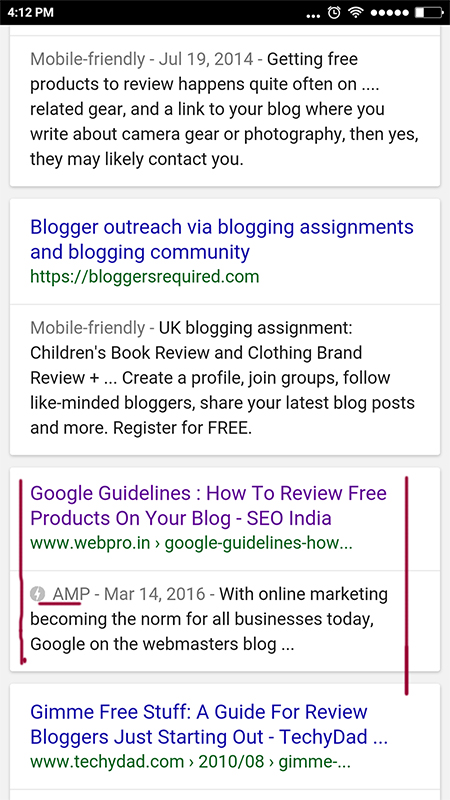
Hence, soon the AMP pages will move out from the Top Stories section and will be a part of the SERPs. Considering how the mobile usage is exponentially increasing , making your site AMP compliant and tracking its performance is a necessity.
In order to add Google analytics to the AMP Pages, include the following script in the <head>, before the AMP JS library:
<script async custom-element=”amp-analytics”
src=”https://cdn.ampproject.org/v0/amp-analytics-0.1.js”></script>
Add the amp-analytics element to the body of your page. Then to enable the built-in support for Google Analytics, set the type attribute of the amp-analytics element to ‘googleanalytics’. It is recommended to include an id attribute so that you can easily identify each amp-analytics element (e.g. debugging).
<amp-analytics type=”googleanalytics” id=”analytics1″>
…
</amp-analytics>
Note: It is recommended that you set up and use a separate property for AMP measurement.
Some other vendors offering Analytics For AMP Pages are:
- Adobe Analytics – marketing.adobe.com
- AFS Analytics – afsanalytics.com
- AT Internet – developers.atinternet-solutions.com
- Chartbeat – support.chartbeat.com
- Clicky Web Analytics – clicky.com
- Cxense – wiki.cxense.com
- Google Analytics – developers.google.com
- INFOnline / IVW – www.infonline.de
- Krux – help.krux.com
- Linkpulse – docs.linkpulse.com
- Lotame – mylotame.force.com
- mParticle – docs.mparticle.com
- Parsely – parsely.com/docs
- Piano – vx.piano.io
- Quantcast Measurement – quantcast.com
Validation
To check if the analytics code is correctly added one can validate the AMP pages on https://validator.ampproject.org/
Related Posts On AMP:
AMP Pages To Be Shown In Main Google Search Results – Preview The Experience

Bharati Ahuja is the Founder of WebPro Technologies LLP, an SEO and digital strategy company she established in 2001. With over two decades of experience in search engine optimization, digital marketing, and ethical web strategies, she has been at the forefront of helping businesses build sustainable visibility online.