Matt Cutts Answers... How can small sites become popular?

Matt Cutts answers a question which bothers all the SMEs and Ecommerce website owners who start small and have to first establish a brand before they can actually do flourishing business on the web.

He gives the examples of Facebook, Instagram and MySpace which all started small but because of their agility and new ideas made it big. Any site though small initially has a potential of making it big online if you focus on user experience, if the site offers something that returns more value and the content offers quality, in-depth and insightful information.

He mentions that whatever area you are in if you are doing it better that the others then over a period of time you can expect your site to do better and better.

However if you are a 'one person' website versus a 200 person website then of course it will make a difference but again if you focus on quality content and user experience by narrowing down to your niche area first then gradually you can earn a good search presence by building it over a period of time which may help you compete with the so called bigger sites.

How To Check If Your SEO Is Establishing Your Brand Online Correctly

In 2014 anyone serious about search and online presence needs to create an online persona and establish a brand online.

Since many years companies have been investing in SEO but how can you be sure that your SEO has helped you establish your brand online ?

The way your brand presence is established is an offshoot of the SEO efforts put in by your SEO company.

We keep on analyzing the analytic reports and regularly focus on visits (Now Sessions) , unique visitors (Now called Users) , rankings, bounce rate, landing pages, search queries, etc to judge the SEO performance but SEO has another very important deliverable i.e ‘To Establish Your Brand Online’ with every footprint they help you create on the web.

The task of establishing the brand presence is not an independent task but is woven into the on-page, off-page and technical factors of the SEO deliverables.

Every little task performed by the SEO to make the SEO campaign successful helps to promote your brand or harms the brand presence.

10 Things To Check If Your SEO Is Establishing Your Brand Online

 1. Google your brand name and check the results on the web, images and video search options.

Do a brand name search and see the results. If the SEO campaign is in the right direction the search listings on the first page should be about the pages where your brand name is mentioned or is majorly correlated to. Many times it will show the social media pages of the company and of course the website/blog will be listed in SERPs

2. Use Google Alerts to monitor your brand.

Apply for Google Alerts for the brand name search and be notified whenever people mention the brand name on the web.

3. Check the analytics trend for branded search queries and keywords
Use the filter option in Google Analytics to find out the search queries and keywords which have the brand name included in.

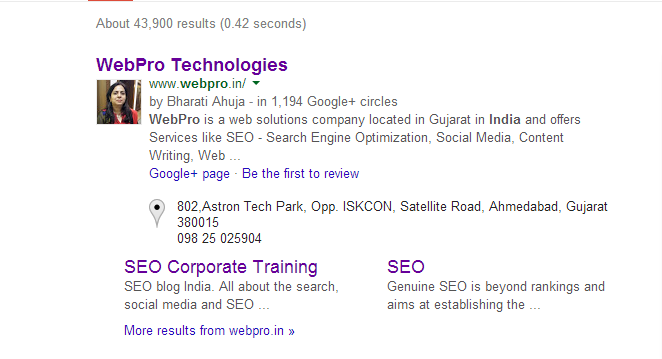
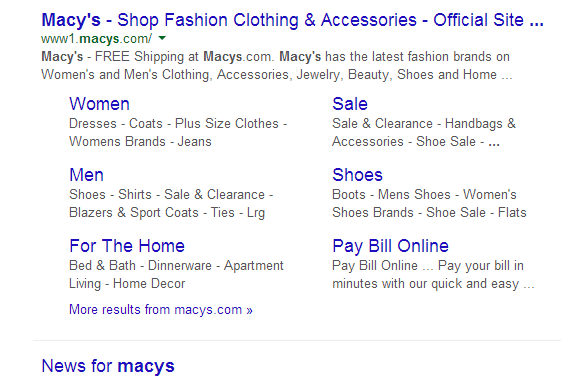
 4. Check Sitelinks In SERPsDo a search for your brand name or your brand name + Your Country

If Google has allocated site links then the search results may be as above. The site links can be more in no. as seen below:

5. Schema For Logo And Address

Check if the logo schema has been added to the page . This helps in correlating the logo image of the company to the brand.

The code for logo should be as follows:

<div itemscope itemtype="http://schema.org/Organization">
<a itemprop="url" href="http://www.example.com/">Home</a>
<img itemprop="logo" src="http://www.example.com/logo.png" />
</div>

The code for Address is as follows:

<div itemscope itemtype="http://schema.org/PostalAddress">

<span itemprop="name">Google Inc.</span>

P.O. Box<span itemprop="postOfficeBoxNumber">1234</span>

<span itemprop="addressLocality">Mountain View</span>,

<span itemprop="addressRegion">CA</span>

<span itemprop="postalCode">94043</span>

<span itemprop="addressCountry">United States</span>

</div>

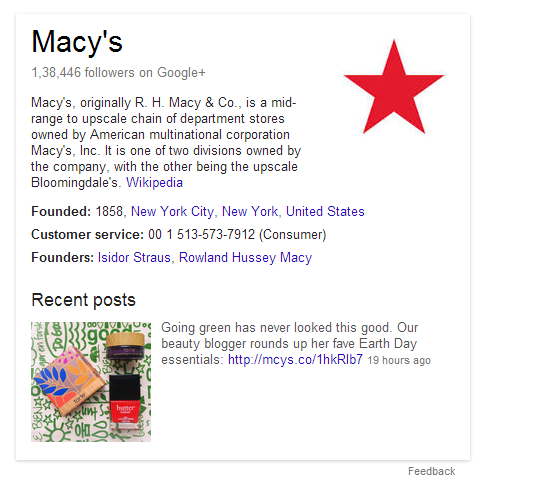
6. Knowledge Graph

With the Knowledge Graph, Google is trying to make search more intelligent. The results are more relevant because the search engine understands these entities, and the nuances in their meaning, in the same way the user does. This makes the search engine "think" more like the user.
Knowledge Graph Example:

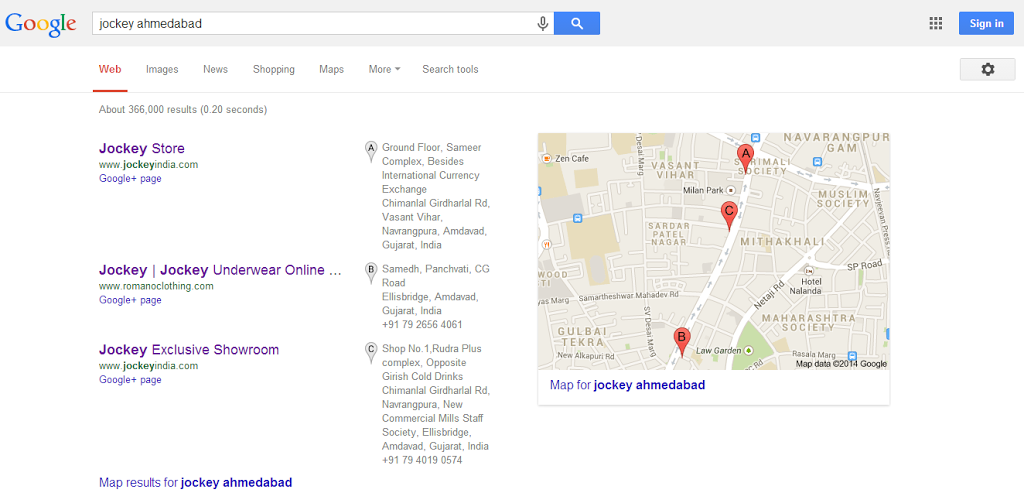
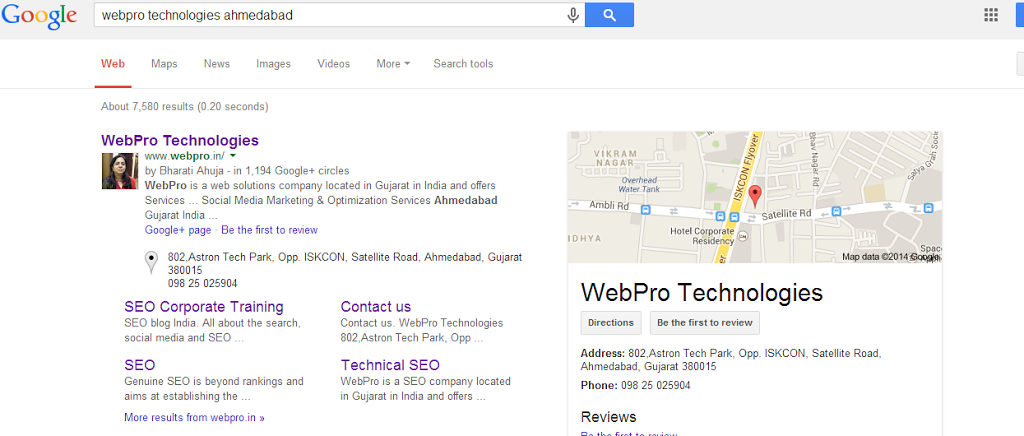
7. Local Search

Check if you have a presence on local search and for queries having a local intent. Search for your brand name or any targeted search query and your local area name and see if you have a presence on local search results.

OR

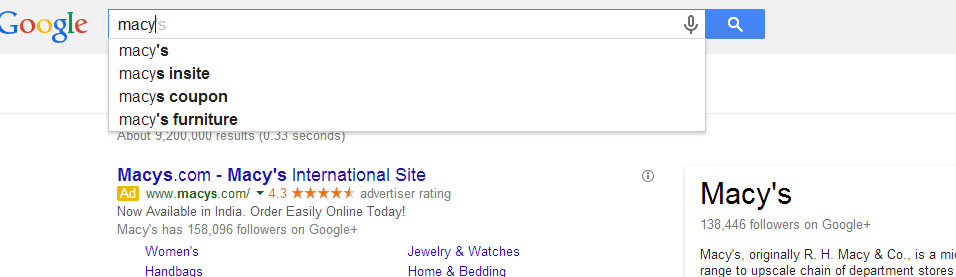
8. Google Suggest Auto Complete

Check and see what the Google Auto Complete suggests for queries related to your brand. This reflects the reputation the brand is gathering and getting correlated to over a period of time on the web.

9. Publisher Markup

Publisher Markup should ideally be added to the home page of the blog and the Authorship Markup to the blog post pages. This gives due credit to the company and the authors of the blog.
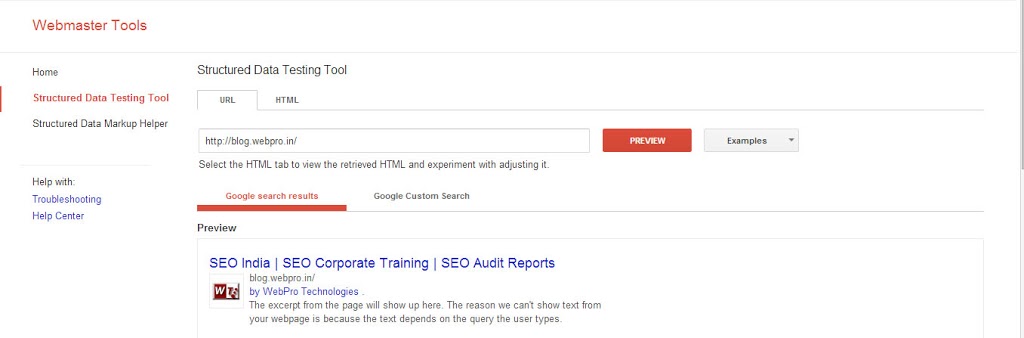
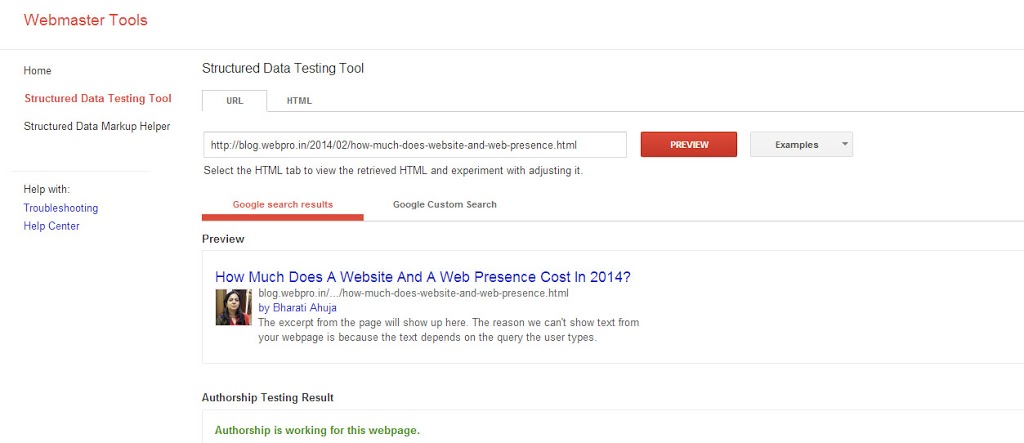
This correlates the company logo and gets displayed in the SERPs when the home page URL of the blog is listed and the blog post pages when listed show the author image.Check this using the Rich Snippets Tool:

10. Social Media Account Page Designs

Check if the Social Media Account pages convey the brand message and display the logo clearly.Any genuine SEO will give priority to these aspects when working on the On-Page, Off-Page and Technical factors of SEO during an SEO Campaign and as a website owner your priority should be to check how your brand evolves on the web first and then check for other metrics.

Related Blog Posts :

Some SEO Myths Debunked By Matt Cutts (Head Of The Search Spam Team at Google)

In a recent video  Matt Cutts (Google Head Of The Search Spam Team)  spoke about a SEO myth which seem to be prevalent today.

He clarified : Just because you have an active Google Adwords account your organic search presence is not going to be positively or negatively affected. As, paid search and organic search are completely two different scenarios.

This is a very common question asked by many of our clients because they think that if you advertise with Google then Google  will promote their search presence on organic
search too. Many times they even have gone to the extent to tell us that if they have an Adwords account then Google will penalize their search presence as Google would want them to continue with the Adwords.

Thanks to Matt Cutts for clarifying this because now we canjust play this video and clear their doubts.

He also speaks about the group thinking that people resort to after reading blogs and forum posts. People just many times blindly follow certain statements mentioned by online marketers or business owners and consider it to be the gospel truth. Matt Cutts mentions that people should stay away from such herd mentality and believe that Google just has one goal in mind and that is to give better quality search results to the users.

I hope he clarifies other myths related to SEO in future and makes life easy for us SEOs.

The Trials And Turbulence Of Overall Web Presence Management – Claim and Manage Your Digital Assets

If SEO , Social Media , Content Creation, hosting, etc. are all handled by different agencies with no clear strategic leader coordinating all these activities then there is a lot of confusion and chaos and the blame game begins when the ROI has to be calculated . Such a situation is not less than a catch22 situation.

In 2014 it is all the more challenging as each and every task is becoming more and more specialized and in order to run a decent size online business a team of minimum 3-5 people having specialized knowledge of design, development, SEO, online marketing and overall business sense is needed.

In order to chalk out a path of seamless customer online experience there are a no. of activities which need to work smoothly in the backend. The challenge lies in harnessing the benefits of all these activities so that it results in a cohesive force which will make the seamless customer experience run smoothly .

Businesses today are giving the importance to online presence and are also diverting existing staff to various functions to maintain the web presence but yet most of the businesses are doing so in bits and pieces.

Web Presence Management

The need of the hour is to manage all the activities for successful online presence in-house by having a dedicated team or outsource it to different specialized agencies by defining the scope of each agency very clearly and appointing a person in-house to co-ordinate with the different agencies to achieve holistic success or find a company which offers turnkey solutions and offers all these services under their hood.

Whoever is appointed to perform the tasks the focus should be on the execution, delivery and organizational transformation.

Today it is primarily necessary to:

· Fundamentally change the marketing operating model

· Build new skills internally

· Get aligned with the right set of partners

· Drive digital orientation throughout the enterprise

Its not only enough to develop a good website and hire SEO services but an overall online presence management is what is needed.

Wikipedia defines Internet Presence Management (IPM) and Online Presence Management (OPM) as follows:

Internet Presence Management (IPM) is comprehensive and progressive approach to Search Engine Optimization (SEO), Search Engine Marketing (SEM), Social Media (SM), and other web based promotion methods. Internet Presence Management is the process of controlling or influencing the Web presence, or Internet-based channels of an organization or company, with the goal of increasing that entity's online presence and overall internet efficiency.

Online Presence Management is the process of presenting and drawing traffic to a personal or professional brand online. This process combines web design and development, blogging, search engine optimization, pay per click marketing, reputation management, directory listings, social media, link sharing, and other avenues to create a long-term positive presence for a person, organization, or product in search engines and on the web in general.

Whether you call it IPM or OPM being found by the people who are searching for the services offered by you plus reaching out to people who you think may need the services offered by you is the way to online success.

Just focusing on one activity is not enough and moreover the Online marketing scene keeps on changing at a very fast pace and every year we have new trends emerging unlike the traditional form of marketing where more than the trend it was the strategies which had to be kept on changing.The emerging online marketing trends are due to the technological changes and the improvements in the internet services which have reached even to the remote and not so developed places .

We have heard statements like Banner Ads. Are Dead, Email is Dead, SEO is Dead in the past years but despite all these claims we still see that these banner ads., email and SEO are still very much alive along with the fast emerging trends like social media.

So, when you have more no. of options available the right attitude, is to make the most of all that you are offered and wisely decide which method of marketing is more suitable for the kind of product or service your company offers.

Every form of marketing has got its strengths and weaknesses and the wise thing is to select a right mix for the best way to promote your product and protect your brand image.

The main challenge lies in integrating all types of media and working out a right strategy based on the location, mindset and the product or service concerned.

The major services required to have a digital presence today are:

1. Domain & Hosting Services

2. Web Design & Development Services

3. SEO – Organic Search & Local Search

4. PPC – Paid Search

5. Content Management

6. Web Analytics (Marketing Analytics & Customer insights/analytics)

7. Social Media Services (Execution & Monitoring)

8. Brand Strategy Development

9. Email Marketing (Especially for existing customer base)

10. Conversion Ratio Optimization (CRO)

11. Improving User Experience

12. Manage ROI

If all these services are offered by one company then minimum coordination is required but if all these services are offered by different companies and your business team has to coordinate with all these companies to achieve the desired online presence then it surely is a challenging task and many may result in a clash when the ROI from each service is calculated.

All the above mentioned activities are interconnected and directly or indirectly influence the search and overall web presence. Its not only about the marketing mix but the management of the marketing mix in such a way that the online and search presence are influenced in a positive way .

The business owner has to focus on the following to achieve the goal:

1. Collaborate with multiple partners/agencies

2. Ensure that the brand and business is understood by all these agencies correctly

3. The person appointed to coordinate and collaborate with all these agencies should have a technical and marketing background.

4. Claim the digital assets by having the login details and passwords created for digital presence

5. Should work on achieving integrated marketing effectiveness.

6. Should efficiently manage and allocate budgets for all the activities

7. Monitor the effective execution of all the activities.

8. Should take quick decisions whenever needed.

9. Effective communication during this coordination plays a key role in this whole scenario.

Needless to say that digital is here to stay and an effective web presence is undoubtedly going to lead to quality search presence. But, this turbulent webosphere along with the opportunities is also all the time posing challenges when it comes to managing it effectively to achieve the set goals.

These challenges faced while managing an optimum web presence is going to be the cause of a lot of frustration but the only solution is to keep pace with the ever changing nature of the web and face the turbulence by constantly updating yourself with the latest trends, creating and keeping in mind from the lessons learnt from the past mistakes made.

Why Regular Website Maintenance and Monitoring Is The Key To Online Success

A website needs regular website maintenance to function properly. There are many issues related to websites which need regular attention so that the website can remain unharmed by malicious attacks and can always remain updated with the latest information and content.

Regular website maintenance is the key to online sustainability. Website owners think that once their CMS website has been built, you don’t need to do anything more to it other than add content but that is just one aspect of the overall website maintenance.

cost cutting on web maintenancemay be Penny Wise But Pound Foolish

Website Maintenance comprises all the activities needed to ensure the smooth functioning and operational integrity of the website.

The activities which fall under WEB MAINTENANCE are:

  • Website Publishing
  • Website Quality Assurance
  • Manage Communication With Website Visitors
  • Measure Success Of The Website
  • Manage technical aspects of the website

The no. Of people needed in the team may vary from 1 to 5 or more depending on the size and complexity of the website.

The decision of maintaining the website in-house or outsourcing to an agency also depends on the size of the website and also on the availability of people having the required knowledge to maintain the website in-house.

Website maintenance is a challenging task that many businesses do not have the time for. Some may lack the knowledge and tools needed for proper website upkeep. One solution is to hire a company that specializes or offers web maintenance services.

Usually people invest a huge amount developing a good website and many times also spend on promoting the website online but in the name of maintenance they assume that only adding content is enough and as they can easily manage that via the CMS very little attention is paid to the other aspects of the website. Such as,

  • Check for errors and broken links
  • Check for security holes
  • Install new tools, plugins and functions
  • Update contents
  • Update back-end platfom and software patches
  • Back up database and content, etc.

Today if you have a medium sized dynamic website or a large eCommerce website then while allocating budgets for SEO, PPC, Social Media, Content, etc. One needs to allocate a certain budget for the regular maintenance also.Else, such a cost cutting may prove to be Penny Wise But Pound Foolish.

Though your SEO may warn you many times with the technical issues but may not make the actual changes on the website as they may require a web developer to execute those changes or it may not fall under the scope of the SEO Contract.

Last year in June we mentioned in one of our blog posts that “When all these activities are to be managed in-house it requires a very big budget and specialized skill sets or if outsourced it needs precise coordination. The challenge that the online business owners small or big brands face today is how to the get the maximum ROI from the selected set of the above activities they decide to focus on for a wider and a qualitative digital presence.”

There are many activities when executed in coordination ensure the success of the website and help the website owner achieve the goal for which the website was developed in the first place.

If you are planning to invest in a small basic website or a medium size dynamic website or a large eCommerce website then please consider all these aspects before venturing out on the virtual sands for business. As many times individually each agency may be doing their bit but the overall success is a mirage because of the lack of coordination.

Hence all these activities can be managed in-house by having a dedicated team or outsource it to different specialized agencies by defining the scope of each agency very clearly and appoint a person in-house to co-ordinate with the different agencies to achieve holistic success or find a company which offers turnkey solutions and offers all these services under their hood.

Responsive Web Design Or A Mobile App – How To Decide?

Undoubtedly the future belongs to the mobile. Speaking at SMX West last week Google’s Matt Cutts said that he “wouldn’t be surprised” if mobile search exceeded desktop queries this year. A similar comment was made by a Google speaker informally during a roundtable discussion at the International Franchising Association conference in New Orleans earlier this year.

As per a recent report published by Cisco, some interesting mobile market trends can be witnessed in the next 5 years:

● Monthly global mobile data traffic will surpass 15 exabytes by 2018.

● The number of mobile-connected devices will exceed the world’s population by 2014.

● The average mobile connection speed will surpass 2 Mbps by 2016.

● Due to increased usage on smartphones, smartphones will reach 66 percent of mobile data traffic by 2018.

● Monthly mobile tablet traffic will surpass 2.5 exabyte per month by 2018.

● Tablets will exceed 15 percent of global mobile data traffic by 2016.

● 4G traffic will be more than half of the total mobile traffic by 2018.

● There will be more traffic offloaded from cellular networks (on to Wi-Fi) than remain on cellular networks by 2018.

Cisco Forecasts 15.9 Exabytes per Month of Mobile Data Traffic by 2018

The global web traffic coming from mobile, smartphones and other small screen hand held devices have been on a rise for the past 20 months. On the contrary, web traffic coming from desktop devices are on a decline.

So the major question is that in order to prepare your website for the mobile arena should you go for a responsive design or should you create a mobile App ?

Responsive web design (RWD) is a web design approach aimed at crafting sites to provide an optimal viewing experience across a wide range of devices -from desktop computer monitors, tablets to mobile phones. In particular, reacting to the width of the browser window -- not just flowing the text, but often changing aspects of page layout. Responsive web design is the latest web design trend of 2013 and becoming a standard practice for the web design industry .

A Mobile App resides on the device, and doesn't require Internet access to run (although it may require Internet access to perform most tasks). Mobile app code may be native code, written (or generated) for each mobile platform (Android, iOS, Windows, etc.), or it can be HTML, CSS, and JavaScript wrapped in an "app shell" using a tool like PhoneGap or RhoMobile -- or a combination of these approaches.

The decision should be made after considering the following aspects:

What Is Your Purpose?

If you have a product that offers potential for ongoing micro-purchases, then a native application is the way to go. A shopping cart on your website can facilitate this, but the in-app purchasing system is so simple and tied into all the rest of a user’s purchases on the platform that it is second to none. Else a Responsive Design may be the right solution to reach out to users across the mobile platforms.

What is your budget?

A Responsive Design demands a lesser investment than a Mobile App. If you have a limited budget go ahead with a Responsive Design. If mobile transactions and in-app purchases represent a significant portion of potential revenue, investing in app development could be the smart decision. But if you can’t afford the spend immediately, start with a responsive website and add the native app as part of a future iteration.

Is SEO important?

If you need to develop a search presence first and then go ahead with the online business then a Responsive Design is a safer bet as Apps are recommended for specific functions and mobile transactions but if you have to create an online brand presence and awareness first then a Responsive Design is the right decision as compared to a Mobile App. But again if you have a larger budget and can invest in both then why not?

Do you need to make frequent updates?

If you expect to have frequent design updates, a responsive design may be the simplest way to ensure your users are accessing the latest information.

If you decide to go ahead with the decision to develop an App. Then,

  • First consult the analytics and find out the no. Of people accessing your site via Android, iOS and other mobile platforms.
  • Determine the main purpose of the App.
  • If you will be sending and receiving massive amounts of data then an app will generally work faster than a responsive website since it doesn’t rely as heavily on Internet and network speed to serve up information.
  • If you need to use the camera, GPS, scan feature, or other phone functions , then an app is likely the way to go.
  • One of the great features in a mobile app is the ability to craft personalized experiences for the device. Since a mobile application resides on the user’s device, it is capable of targeting and crafting the user experience. For example, within a mobile app a user can create and save a profile, which allows them to customize their interactions. Apps have the ability to provide the most tailored User Experience.

The differences between an App and Responsive range from the subtle to obvious, but the answers lie in truly understanding your goals, target market, and restraints. In many cases, both a mobile app and a responsive website is the right decision and after considering the above aspects one can confidently take a decision depending on the need, requirement and resources available.

Top 5 Ways to Annoy Your App Users

  1. Forced registration.
  2. Complicated navigation.
  3. Preference amnesia. 
  4. Long forms.
  5. Ratings prompts
5 Mistakes to Avoid When Creating Branded Apps

  1. Recreating the web experience.
  2. Ignoring the rules.
  3. Throwing branding out the window.
  4. Overlooking privacy.
  5. Assuming there's an audience.

What Is EXIF Data ? Does Google Use EXIF Data From Pictures As A Ranking Factor?

EXIF stands for Exchangeable Image File, and the data provided can be stored to JPEG, RAWand TIFF image file formats. The data itself can reveal some pretty interesting stuff about your photos. As well as the exact time and date you clicked the picture (provided your camera time and date was correct, of course), a lot of technical information regarding the photograph is captured as well.

The Exif tag structure is borrowed from TIFF files. For descriptive metadata, there is an overlap between EXIF and IPTC Information Interchange Model info, which also can be embedded in a JPEG file.

The Exif format has standard tags for location information. As of 2014 many cameras and most mobile phones have a built-in GPS receiver that stores the location information in the EXIF header when a picture is taken .

As digital content determines your search and web presence, any data connected with the how, when, where, why of the creation is very important. As this meta data establishes correlations and adds meaning to the content.

EXIF data can offer information which can help search engines establish correlations with the search queries made by the users especially for the queries that require freshness and the file format.

Meta data accessed via EXIF is accurate and genuine hence the search engines may gradually rely more on it and may also start using it as Matt Cutts explains in the video below:

If you want the explore the data on the images then EXIFdata.com is an online applicatation that lets you take a deeper look at your favorite images!

The details I got about an image on exifdata.com  are as follows:

EXIF Data Summary
EXIF Data Details

How To Tackle 5 Major SEO Issues Having An Adverse Effect On Your Site

If your SEO has resorted to certain SEO techniques which are now creating an adverse effect on the site due to the latest algorithmic updates then you have to resort to undo all this by having a systematic and structured approach.
All the side effects of all the incorrect SEO methods implemented can be rectified and undone most of the times, but a lot of patience and step by step strategy is needed .

How To Tackle 5 Major SEO Issues Having An Adverse Effect On Your Site

Let us discuss a few issues which maybe hampering the search presence growth of the site.

  • Unwanted Links
  • Scraper Sites
  • Duplicate Content
  • Dynamic URLS
  • Page Load Time

Unwanted Links

Make a list of inbound links to your site using any tool like Screaming Frog or any other SEO tool. Make a list of inbound links which Google shows in Webmaster Tools. Filter out the links which according to you are spammy.

Try to manually remove those links if possible or send a request to the webmaster of that site to get the links removed.Use the Disavow tool even if you have not got a manual penalty in webmaster tools.Keep monitoring the external links section in the webmaster tools and if the links that you have been successful in removing are not showing in webmaster tools then you are progressing. Repeat the process till all the unwanted links are removed .

Duplicate Content:

I came across an issue with a site which had a lot of legal case studies on their site and the similar case studies were available on many other sites as these details were provided by the legal registrars in PDFs which could be added on the site as it is without modifying any content. This content was very helpful for the client as they could send links to these case studies as references when discussing similar issues and inform the about the legal decisions taken.

The site was a genuine site but due to the Panda update the site had been affected adversely. The action taken was to shift all these pages under a subdomain and refer that subdomain as a news site. The subdomain is regularly updated with fresh content and case studies with additional inputs from the client. This solved the issue of duplicate content and logically categorized the content.

But, if you have an issue of duplicate content within the site then using the canonical tag or a 301 redirect correctly is the only way out.

Scraper Sites

There are many sites which copy content from other sites and post them on their blogs or sites. Though Google can detect a scraper site as the original content will have an earlier indexed date but there may be times when the scraper site outranks the original site which may affect the search presence of the original site.

Google has an option for that now . You can fill the Google Scraper Report form . webmasters can submit scraper sites that has copied their own content by providing Google with the source URL, where the content was taken from, and the URL of the scraper site where the content is being republished or repurposed, and the keywords where the scraper site was ranking on.

Dynamic URLs

Dynamic URLs are generated when the content on the page depends on the selection the user makes and the content is displayed from the databases. Hence the content varies from user to user. Dynamic URLs often contain the following characters: ?, &, %, +, =, $, etc.

A dynamic URL is a page address that results from the search of a database-driven web site or the URL of a web site that runs a script. In contrast to static URLs, in which the contents of the web page stay the same unless the changes are hard-coded into the HTML, dynamic URLs are generated from specific queries to a site's database.

SEOs used to have a SEO Friendly URLs for such pages which eliminated the parameters. As of today this is not considered correct. Recently Google announced that Google wants the necessary parameters in the URL and can index such URLs. http://googlewebmastercentral.blogspot.in/2014/02/faceted-navigation-best-and-5-of-worst.html

For example on the basis of the selection of area, type and budget I make on a real estate site the URL generated is :

http://example.com/portfolio/?location=Canggu&type=Apartment&price=250.000+-+350.000+USD&propertylist=

This is itself a dataset which conveys a meaning that this page contains data in the range selected which can be very useful for a user who makes a similar search on Google.

Hence, retain the necessary parameters in the dynamic URLs and do not point them to a single SEO Friendly URL. As this may be considered incorrect by Google because the URL will remain constant for each selection but each time Google indexes it the content will keep varying which does not serve any purpose either to the user or the search engine.

Page Load Time

Regarding Page Load Time And Speed Google says: Speeding up websites is important — not just to site owners, but to all Internet users. Faster sites create happy users and we've seen in our internal studies that when a site responds slowly, visitors spend less time there. But faster sites don't just improve user experience; recent data shows that improving site speed also reduces operating costs. Like us, our users place a lot of value in speed — that's why we've decided to take site speed into account in our search rankings. We use a variety of sources to determine the speed of a site relative to other sites.

For decreasing the page load time the best way is to login to the webmaster tools account and go to ‘Other Resources’ then select the ‘Page Speed Insights’ 80% of the issues will be tackled if you follow the suggestions on the PageSpeed Insights Page.

But at times when all the SEO effort put in to undo the harm does not show results then the best decision is to start afresh by killing the site. But before you take such a drastic decision, its worth the while to give it a try before saying quit.

How Much Does A Website And A Web Presence Cost In 2014?

A web presence for any business is mandatory and cannot be ignored. But the most difficult question which rarely anybody answers with complete details and satisfaction is ...How much do I have to spend or rather invest for a good web presence which will in future generate the necessary ROI.

Let us analyse the cost factors and try to discuss how much a business has to invest in order to be alive online in 2014.

No doubt a website can be created using free tools but it has its own disadvantages. It usually will look like other sites which have used the same template and will not have the flexibility to add customized functions and features.

The Break down of each cost factor:

  1. Domain 
  2. Hosting 
  3. Web Design 
  4. Web Development 
  5. SEO 
  6. Online Marketing 
  7. Continuous Maintenance 

1. Domains: Registering a domain may cost anything between $10 - $20 (INR 600 to INR 1200 approx.) per year depending on the TLD you select.

2. Hosting : Selecting a good hosting platform ensures that the site has maximum uptime, offers regular technical support and also offers expansion features as the website grows in size and traffic. A good secure server can also protect the site from the hacking attacks by offering security features. The cost of a good hosting platform can vary from $100 to $250 (INR 6000 to INR 15,000 approx.) per year.

3. Web design: Web design is the look and feel of the website which creates the first impression. The costing of this factor is based on the layout, time to design, selection of images and graphics, etc. A normal static 15 – 20 pages website can range from $250 - $600 (INR 15,000 to INR 40,000 approx.).

4. Web development: Web development is the added cost for websites which requires added customized functionality like CMS, eCommerce, database driven applications, etc. The cost of such websites depend on the features and functionalities to be embedded. It may range from $1000 - $10000 (INR 60,000 to INR 6,00,000 approx.) or more.

5. SEO : SEO makes the site capable of having a search presence and can cost from $300 (INR 15,000 approx) per month to $1500 ( INR 90,000 approx.) per month.

6. Online Marketing: Online marketing is the regular presence of the site on the web via social media, blogging, email, etc. The cost of a regular presence can range from $500 (INR 30,000 approx.) per month - $2000 (INR 1,20,00 approx.)per month.

7. Continuous Maintenance: Regular updating of content – (Text, images, videos, etc.) , managing and monitoring the smooth functioning of the site is an ongoing feature for which again the cost depends on many factors like the frequency of the updates, the time taken to make the updates, etc. The maintenance costs can vary from $500 (INR 30,000 approx.) - $3000 (INR 1,80,000 approx.) per year.

Out of the above costs web design, web development are onetime costs. Domain and hosting have to be renewed every year. SEO, marketing and maintenance are an ongoing investment depending on the requirement and the outreach needed.

Hence, quotes for every website have to be designed individually as per the requirement which mostly fall in the above range of investment.

Of course the price may vary from place to place and from company to company. But, before you finalize the development contract of your website, one should be sure that the company is capable of offering a long term support. If the company does not have any base and disappears after the website has been handed over then once again you will have to go hunting for another option when you want to upgrade the site or make some modifications.

A web presence provider company should become an integral part of your business team and should help you gain the necessary web presence just as your bankers help you in your finance related functions to put your best foot forward for your business.

Satya Nadella's First Interview As CEO Of Microsoft

Satya Nadella's first interview as CEO of Microsoft, at the company's campus in Redmond, Wash.

Satya-Nadella

He joined Microsoft 22 years ago because he saw how clearly Microsoft empowers people to do magical things and ultimately make the world a better place. Many companies, he says, “aspire to change the world.

As he says...Mobile first...Cloud first.....

Learn more about Satya athttp://msft.it/msceo

editorial-policy-WebPro-Technologies-LLP-Ahmedabad

Editorial Policy: Human Expertise, Enhanced by AI

At WebPro Technologies, our content reflects over two decades of experience in SEO and digital strategy. We believe that valuable content is built on accuracy, clarity, and insight—and that requires human judgment at every step.

From 2024 onwards, we have been using AI tools selectively to brainstorm ideas, explore perspectives, and refine language, but AI is never the final author. Every article is researched, fact-checked, and edited by our team, ensuring relevance, accuracy, and originality. AI supports our workflow, but the responsibility for quality and credibility remains entirely human.

This hybrid approach allows us to combine the efficiency of technology with the depth of human expertise, so our readers get content that is both informative and trustworthy.

At WebPro, we see AI not as a replacement for human creativity, but as a tool that helps us raise the standard of excellence in the content we share.

SEO Ahmedabad

Contact Info

802, Astron Tech Park, Satellite Road, Opp. Gulmohar Park Mall, Ahmedabad 380015, India

+91 9825025904
info@webpro.in

Daily: 9:00 am - 6:00 pm
Sunday: Closed

Copyright 2025 WebPro Technologies LLP ©  All Rights Reserved