meta-tag-nofollow

Why Robots Nofollow Meta Tag Is a Hint Now, Like rel-nofollow ?

Google Says:

The robots meta tag lets you utilize a granular, page-specific approach to controlling how an individual page should be indexed and served to users in search results. The directives specified using the robots meta tag are used by Google for crawling and indexing the pages and the links on that particular page.

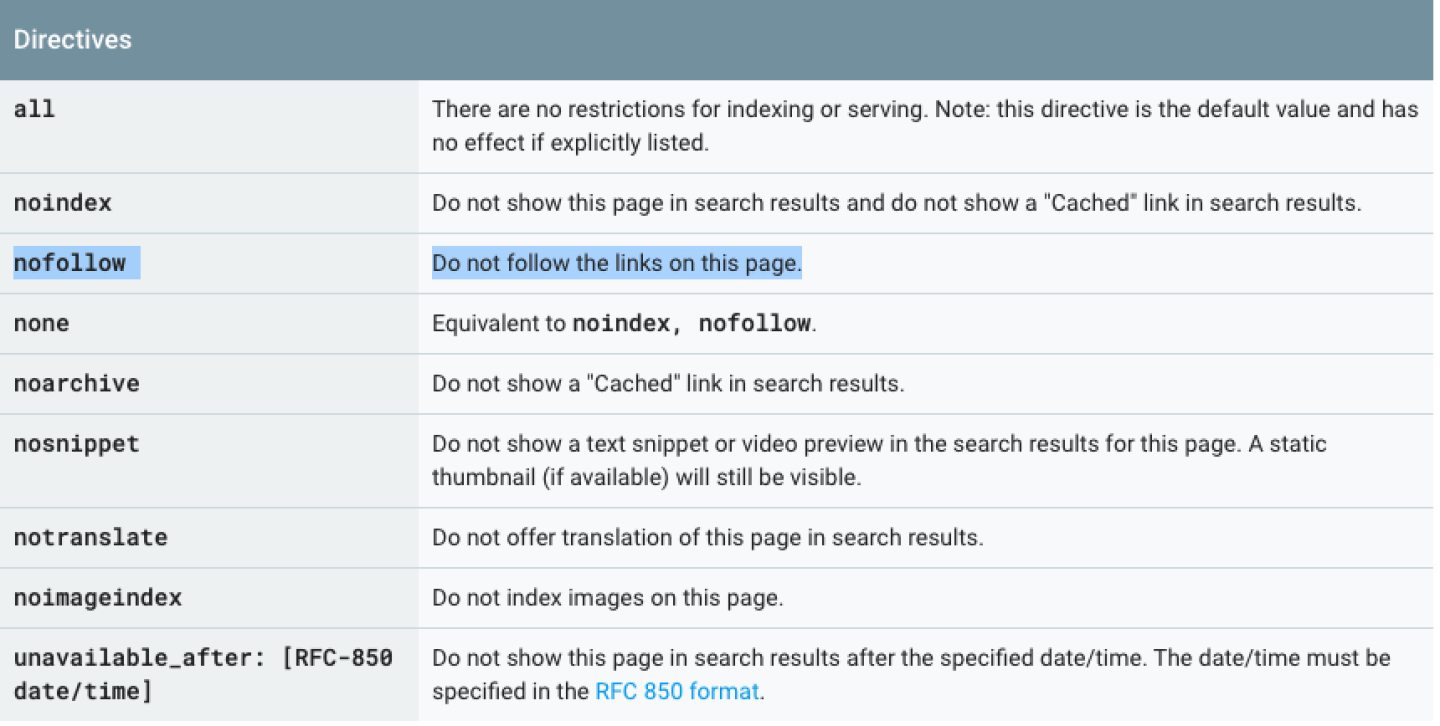
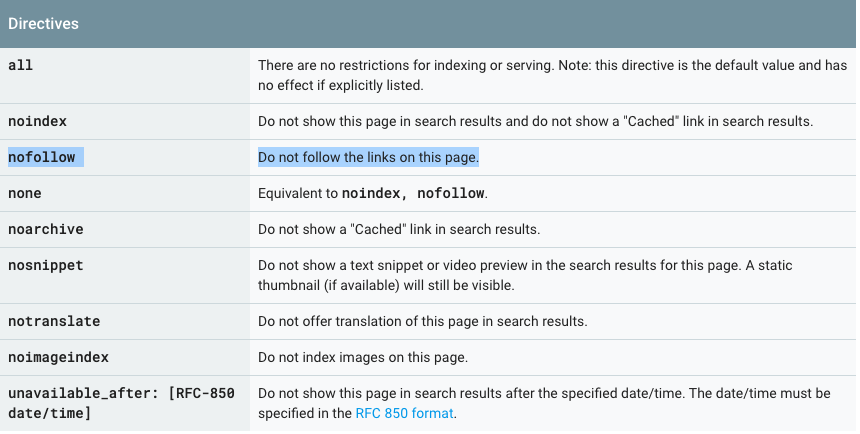
Several other directives can be used to control indexing and crawling. Each value represents a specific directive. The following table shows all the directives that Google honors and their meaning.

Google Directives

The nofollow meta tag <meta name="robots" content="nofollow"> clearly specifies that the if the header of the page has this tag then, Googlebot should not follow the links on the page.

But, the recent announcement by Google introducing the sponsored, nofollow and ugc attributes to be used as rel value in links and has changed the meta tag nofollow from a directive to a hint.

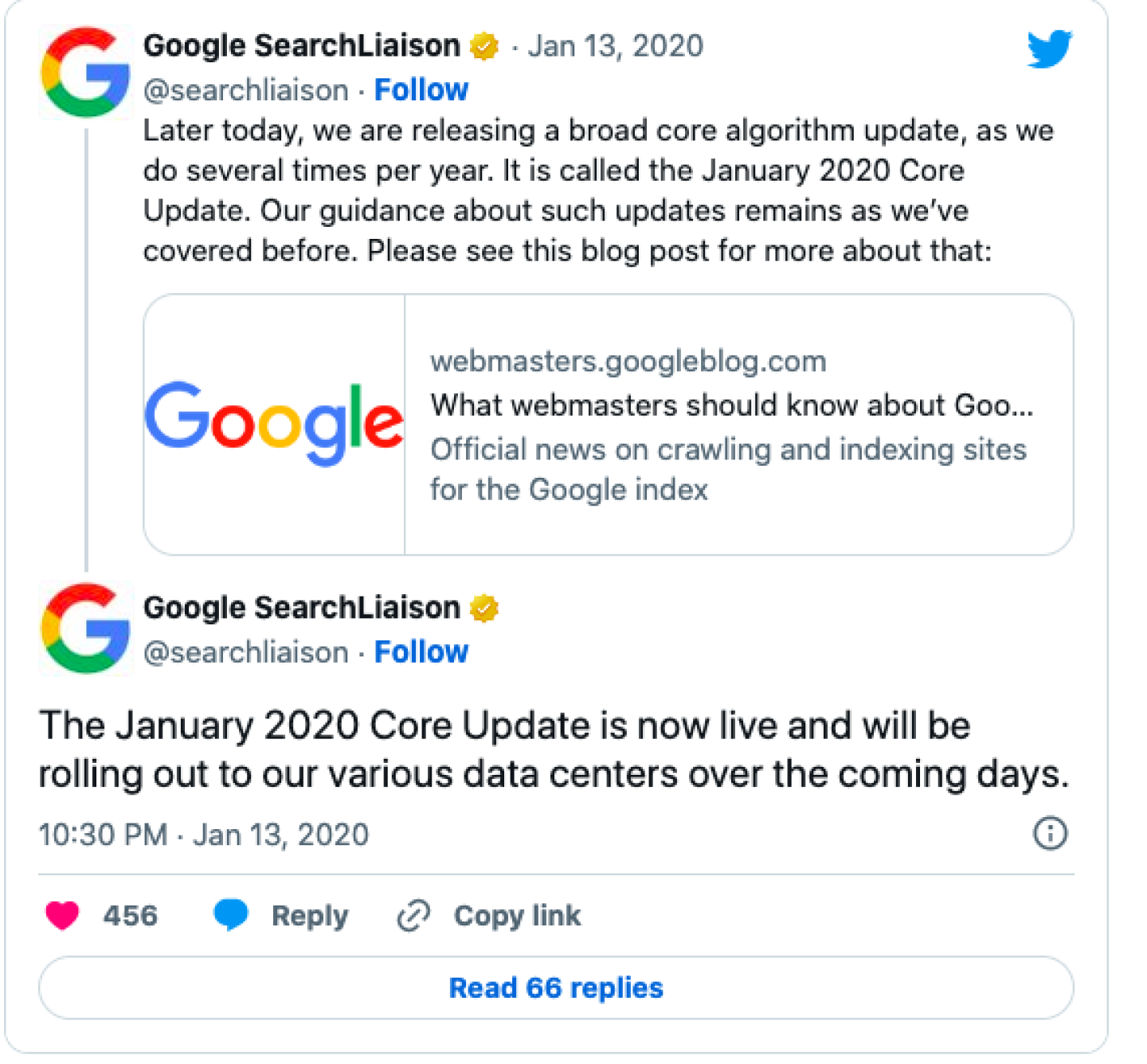
This was clearly stated by Gary Illyes in his tweet :

What is the difference between a directive and a hint?

A directive is a direct specification on which the mentioned action has to be taken by the bots. Hence, earlier when the page had a nofollow meta tag in the header the bot completely ignored the links on that page. A hint means that Google may or may not obey the Meta Robots Nofollow when it encounters it.

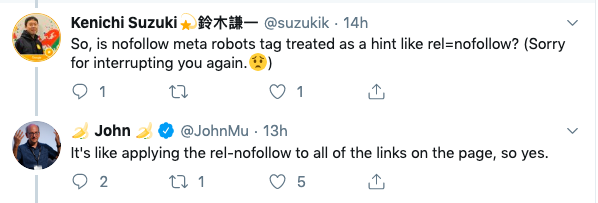
The reason for this is given by John Mueller as a part of the Twitter conversation is as follows:

Google directive and hint

The meta tags are specified at the page level and the rel values are specified for each link. The logic behind the nofollow meta tag becoming a hint rather than a directive is that using <meta name="robots" content="nofollow">  is like using a rel-nofollow to all the links on the page from now on.

One thing that we need to be very clear about is that there are no meta tags for ugc and sponsored. Adding that will just pollute the code with unwanted lines of code.

UGC-attributes-for-SEO

Understanding the Google Nofollow, Sponsored, & UGC Attributes For SEO

Since the time Google introduced the PageRank in the search algorithm the importance to links was an obvious development. This also brought with itself the issue of spam. To combat this spam especially the comment spam, in 2005 Google introduced the “nofollow” attribute.

Its been 15 years now and Google announced on its webmaster blog that the web has evolved and it’s high time this attribute also evolves.

Nofollow attribute

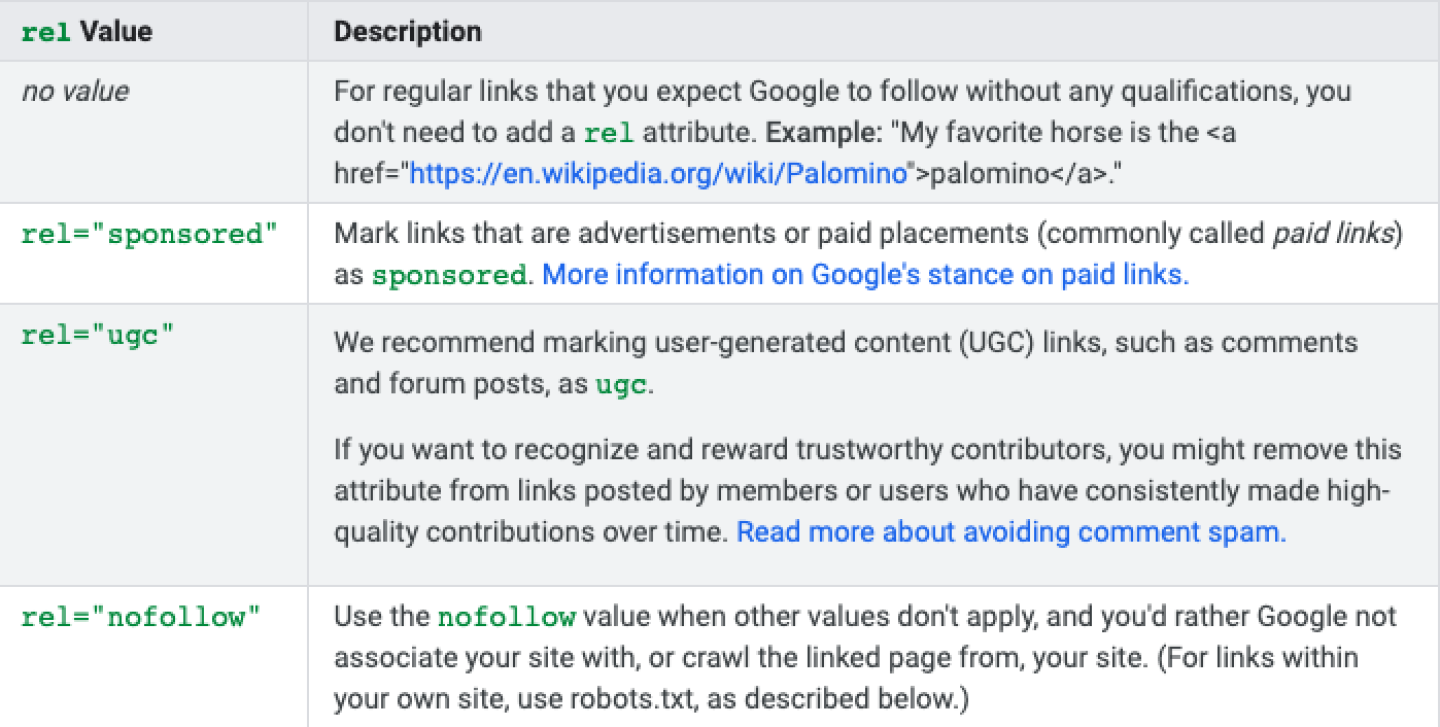
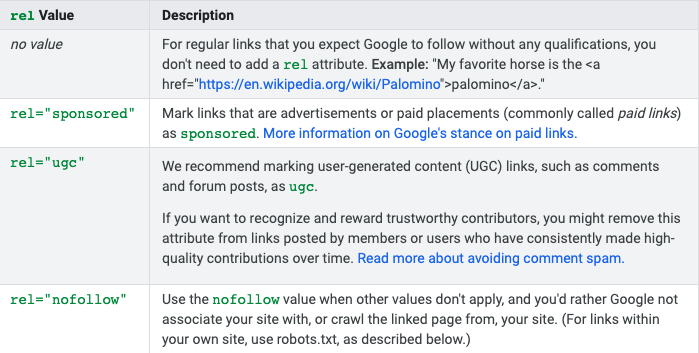
Google has  announced two new link attributes by which  webmasters can specify to Google the nature of concerned links. These are:

rel="sponsored":

This attribute to be used to identify links on your site that were created as part of advertisements, sponsorships or other compensation agreements.

rel="ugc":

UGC stands for User Generated Content, and the ugc attribute value is recommended for links within user generated content, such as comments and forum posts.

rel="nofollow":

This attribute to be used to for cases where you want to link to a page but don’t want to imply any type of endorsement, including passing along ranking credit to another page.

When "nofollow" was introduced in 2005, Google had not integrated its signals in the search algorithm. I mean to say the attribute was there but its purpose for indexing and crawling was not achieved. This will change soon.

Google mentioned :

All the link attributes, sponsored, ugc and nofollow, now will work as hints for us to incorporate for ranking purposes. For crawling and indexing purposes, nofollow will become a hint as of March 1, 2020. Those depending on nofollow solely to block a page from being indexed (which was never recommended) should use one of the much more robust mechanisms like:

The sponsored, ugc and nofollow attributes are basically to specify the nature of the links for which these will be used.

Google also added on the blog :

  • Links contain valuable information that can help us improve search, such as how the words within links describe content they point at.
  • Looking at all the links we encounter can also help us better understand unnatural linking patterns.
  • By shifting to a hint model, we no longer lose this important information.
  • The site owners get the option to indicate that some links shouldn’t be given the weight of a first-party endorsement.

From the SEO perspective the most important aspect to understand is:

The link attributes of “ugc” and “nofollow” will continue to be a further deterrent. In most cases, the move to a hint model won’t change the nature of how Google treats such links. Google will generally treat them as they did with nofollow before and not consider them for ranking purposes. But, Google will still continue to carefully assess how to use links within Search, just as they always have and as they have had to do for situations where no attributions were provided. But, for crawling and indexing purposes, nofollow will become a hint as of March 1, 2020.

Google has also answered the following FAQs on its blog:

  • Do I need to change my existing nofollows?
  • Can I use more than one rel value on a link?
  • If I use nofollow for ads or sponsored links, do I need to change those?
  • Do I still need to flag ad or sponsored links?
  • What happens if I use the wrong attribute on a link?
  • Why should I bother using any of these new attributes?
  • Won’t changing to a “hint” approach encourage link spam in comments and UGC content?
  • When do these attributes and changes go into effect?

you can find the answers on: https://webmasters.googleblog.com/2019/09/evolving-nofollow-new-ways-to-identify.html

search-console-team

Google Bids Farewell To The Old Search Console

The search console is a vital and a valuable tool for the SEOs. No SEO can neglect the data offered in this tool.

As of May 20, 2015, Google rebranded Google Webmaster Tools as Google Search Console.In January 2018, Google introduced a new version of the Search Console, with a refreshed user interface and improvements.

 
Google search-console-team

Google launched the new Search Console at the beginning of 2019. Since then Google has been upgrading the new search console and also responding to the  feedback sent by the webmasters.

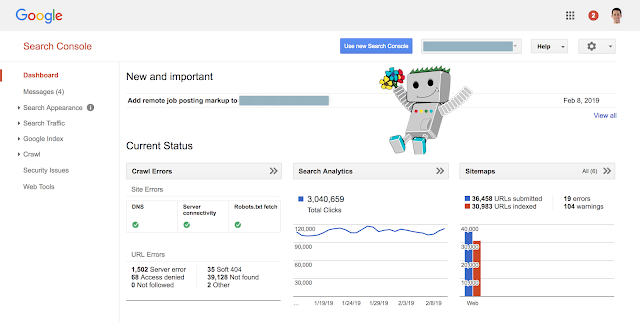
Google has reached another important milestone and has bid a farewell to many old Search Console reports, including the home and dashboard pages.

dashboard-Google-search-console

The old search console which was known as Webmaster Tools prior to 2015 helped site owners and webmasters to monitor and improve their performance on Google Search for over a decade.

Google says:

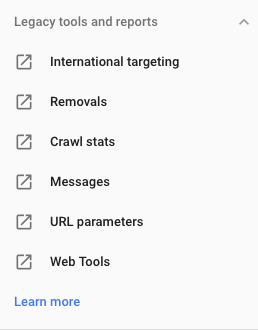
"From now on, if you try to access the old homepage or dashboard you’ll be redirected to the relevant Search Console pages. There are only a few reports that will still be available on the old interface for now - check the Legacy tools and reports in the Help Center. We're continuing to work on making the insights from these reports available in the new Search Console, so stay tuned!"

Google Search Console

If you want to share any Search Console memories or stories, please use the hashtag #SCmemories  on Twitter.

General changes

The new Search Console has the following improvements over the old version:

  • Sixteen months of search traffic data, versus three months in the old product
  • Detailed information about a specific page, including index coverage, canonical URL, mobile usability, and more
  • Tracking flows to help you monitor, fix, and request a recrawl of pages affected by crawling issues.
  • New and improved reports and tools, described next.
  • Works on mobile devices.

Currently unsupported features by the new Search Console:

Here are some features that aren't yet supported in new Search Console. To use them you will have to use the old Search Console, for now.

  • Crawl Stats data (pages crawled per day, KB downloaded per day, page download times)
  • Robots.txt tester
  • Managing URL parameters in Google Search
  • Data highlighter tool
  • Reading and managing your messages
  • Change of address tool
  • Setting preferred domain
  • Associating your Search Console property with an Analytics property
  • Disavow links
  • Removing outdated content from the index
Voice-Search-Stats-768x822

Voice Search And Its Impact On SEO In The Coming Future

What Is Voice Search

Voice search uses speech recognition technology. The users ask their queries and search information through voice instead of typing it.

Google Voice Search or Search by Voice is a Google product that allows users to use Google Search by speaking on a mobile phone or computer, i.e. have the device search for data upon entering information on what to search into the device by speaking.

Typed search queries and voice search queries are worded differently even if the person has the same search intent.

For example: In a text search, you would probably type “best Chinese restaurants in Mumbai;” but if you were to do a voice search, you would be more likely to ask, “is there any good Chinese food around here?”
A voice search is more conversational in style.

When the user uses text search, it is a brief phrase that he keys in. In voice search the user starts a conversation with the device which is a proper question or a sentence.

Hence, more that keywords it is the intent of the search query which is assessed before the search results are served to the user.

Devices Used For Voice Search

  • There are different voice search devices are available in the market
  • Amazon Echo/Alexa.
  • Siri/iPhone.
  • Google Home.
  • Microsoft Cortana.
  • Google Assistant.
  • Android Phones.
  • Tablets (iPad and Android)

The Increasing use of Voice Search (Some Stats.)

Voice-Search-Stats

Types Of Voice Search Queries :

Voice search queries as of now can be categorized in the above 4 categories.

voice-search-micro-moments-1030x415

I want to know moments

Screen Shot 2018-08-13 at 1.36.31 PM

I want to go moments

Screen Shot 2018-08-13 at 1.41.26 PM

I want to do moments

Screen Shot 2018-08-13 at 1.48.18 PM

I want to buy moments

Screen Shot 2018-08-13 at 1.49.56 PM

How To Optimize for Voice Search

The focus for voice search is basically the searcher intent rather than the keywords. But, that does not mean that the basic on-page can be given a skip. The on-page and Technical factors will continue to be important.

In addition to the on-page and technical factors the priority needs to be given to the following:

  1. Try to rank for :

* Featured snippets

*Local Search Results

*Long tail search queries

2.Implement Schemas

3.Make Mobile Optimization a priority (Read More about Mobile Friendliness in our previous post  https://www.webpro.in/what-does-it-mean-to-have-a-mobile-ready-website-in-2018-with-an-emphasis-on-pwa-progressive-web-apps/)

PWA

What Is A Progressive Web App (PWA) ? Why Do I Need It?

A Mobile Ready website is much more than just having a Responsive Website. Let’s explore - PWA , AMP and Responsiveness.

Today if your website needs to be called mobile-ready it needs to be:

  • Responsive
  • (Accelerated Mobile Pages) AMP Enabled &
  • Should also be a Progressive Web App (PWA)

Mobilegeddon & The Google Mobile Friendly Updates. 

Google in November 2014 had announced the ‘mobile friendly’ labels for responsive websites in their search results.

In August 2016 Google stopped displaying these labels to keep the results uncluttered. As by then 80% of the websites in the Google index met the mobile-friendly criteria.

In August 2016 Google started showing the icon  for  AMP pages  in search results.

What Is AMP?

Accelerated Mobile Pages (AMP) are pages which are light weight and load quickly on mobile devices. AMPs are served from the Google AMP Cache, which is a proxy-based content delivery network for delivering all valid AMP documents. It fetches AMP HTML pages, caches them, and improves page performance automatically.

AMP can load quickly but cannot retain the same low speed in case of complex functions like online payments and other, dynamic functionality.

To give a great user experience to the user usually people develop mobile apps. But to avoid the drawbacks of the native apps PWA comes to your rescue.

 What are Progressive Web Apps (PWA)?

A Progressive Web App (PWA) is a web app that uses modern web capabilities to deliver an app-like experience to users. These apps meet certain requirements (checklist below), are deployed to servers, accessible through URLs, and indexed by search engines.

This can work in along with Cordova to provide a multiple deploy targets for all your users.

PWA

Why do I need a PWA ?

  • PWA adds the advantages of a native app to the website.
  • According to, Flurry Analytics, 80% of the mobile user’s time was spent inside apps and 20% on the mobile web. This continues to grow year by year.
  • With mobile devices becoming smarter, the time inside apps is surely going to increase.
  • The app needs to be installed on the mobile device which takes up a lot of storage space. PWA runs from the server leaving a lot of free space for the user on the mobile device.
  • According to, a test, some native apps took up 460 MB of space whereas the PWA just needed 1 MB.
  • In the case of an app, the user needs to be notified to update it. The PWA lives on the server so there is no update distribution lag.
  • PWA can work offline.
  • PWA, being a website fortified with the benefits of an app, is linkable, searchable, and indexable.
  • com had decided to discontinue their website and go app only, but that did not go well with the users.After their PWA named FlipKart Lite the statistics showed 40% returning visitors, +63 conversions from home screen visits and more time spent on FlipKart Lite.

Case Study on https://developers.google.com/web/showcase/2016/flipkart

(Walmart Inc. has announced acquisition of 77 per cent stake in Flipkart in its biggest takeover till date)

Technical Details About PWA:

To give a Fast, Integrated, Reliable and Engaging user experience PWA uses features like Service Workers, Push Notifications, and Web App Manifests.

What Is a Service Worker?

  • A Service Worker is a scriptable intermediate layer between the web page and the network. It is a script that the browser runs in the background, separate from a web page. It includes features like push notificationsand background sync.
  • A Service Worker gives access to an API that provides a programmable network proxy within the client-side context.
  • It makes it easier to create web applications that can handle network requests offline while browsing in varying network speeds.
  • At times, an HTTP request is made but a response is not received on the mobile devices, which can happen when the user goes through a tunnel, or the network varies from 2G to 3G, or the user automatically joins a saturated WiFi network. The Service Worker allows developers to cache assets when connected and offers a seamless experience when offline so user experience is maintained.

Service Worker

Some Technicalities to Note About a Service Worker

  • A Service Worker is not HTML or XML. It is a JavaScript Worker.  Hence, the Service Worker does not access the DOM directly.
  • The script communicates with the relevant pages by responding to messages sent by using the postMessage interface, and those pages can then access the DOM if required.
  • Service Worker is basically a proxy server which serves between apps, browsers, and the network when available.
  • It allows you to control and handle network requests from the pages.
  • The Service Worker script does not run when not in use, and restarts when it’s next needed. Hence, you cannot rely on global state handlers.
  • If there is information that you need to reuse on restart, service workers do have access to the IndexedDB API, which stores data inside the user’s browser.
  • Service Workers use Javascript Promiseson a large scale. Technically, a Promise is a proxy for a value not necessarily known when the promise is created.
  • The browser needs to support Service Workers.

Web App Manifests

The web app manifest is a JSON file. It is a simple text file which has the metadata for the app.

This JSON allows you:

  • to control the look and feel of the app
  • to control how the app is launched
  • to display icons for the user home screen and splash screen which is displayed while the app is loading
  • When the app is launched, you can specify which page gets loaded as well as the screen orientation (portrait/landscape view).

PWA Checklist:

  • Site is served over HTTPS
  • Pages are responsive on tablets & mobile devices
  • All app URLs load while offline
  • Metadata provided for Add to Home screen
  • First load fast even on 3G
  • Site works cross-browser
  • Page transitions don't feel like they block on the network
  • Each page has a URL
  • Site's content is indexed by Google
  • org metadata is provided where appropriate
  • Social metadata is provided where appropriate
  • Canonical URLs are provided when necessary
  • Pages use the History API
  • Content doesn't jump as the page loads
  • Pressing back from a detail page retains scroll position on the previous list page
  • When tapped, inputs aren't obscured by the onscreen keyboard
  • Content is easily shareable from standalone or full screen mode
  • Site is responsive across phone, tablet and desktop screen sizes
  • Any app install prompts are not used excessively
  • The Add to Home Screen prompt is intercepted
  • First load very fast even on 3G
  • Site uses cache-first networking
  • Site appropriately informs the user when they're offline
  • Provide context to the user about how notifications will be used
  • UI encouraging users to turn on Push Notifications must not be overly aggressive.
  • Push notifications must be timely, precise and relevant
  • Provides controls to enable and disable notifications
  • User is logged in across devices via Credential Management API
  • User can pay easily via native UI from Payment Request API.

How do I Test the PWA?

To help teams create the best possible experiences Google hasput  together a checklist which breaks down all the things Google thinks it takes to be a Baseline PWA, and how to take that a step further with an Exemplary PWA by providing a more meaningful offline experience, reaching interactive even faster and taking care of many more important details.

You can run ‘Lighthouse’ which is an open-source, automated tool for improving the quality of web pages. You can run it against any web page, public or requiring authentication. It has audits for performance, accessibility, progressive web apps, and more.

You can run Lighthouse in Chrome DevTools, from the command line, or as a Node module. You give Lighthouse a URL to audit, it runs a series of audits against the page, and then it generates a report on how well the page did. From there, use the failing audits as indicators on how to improve the page. Each audit has a reference doc explaining why the audit is important, as well as how to fix it.

Can I submit a PWA to Google Play Store and App Store?

The PWAs are available through the browser on Android . However the PWA can also be submitted to the APP store and the Google Play Store after packaging it for the relevant store.

Converting your responsive website to a PWA and making it AMP enabled is the new mobile-ready website.

Related Posts:

The Benefits of Combining Accelerated Mobile Pages (AMP) & Progressive Web Apps (PWA)

Understanding The Google AMP Cache

How To Add Google Analytics To AMP Pages


Image credit:

http://webagility.com/posts/how-progressive-web-apps-make-the-web-great-again


GDPR - General Data Protection Regulation : 20 Key Points

  1. GDPR stands for General Data Protection Regulation.
  2. Its purpose is to unify all EU member states' approaches to data regulation, so that all data protection laws are applied identically in every country within the EU.
  3. It will protect EU citizens from organisations using their data irresponsibly.
  4. It ensures that EU citizens are in charge of the information which is shared about them.
  5. It also gives them the charge to know where and how it's shared.
  6. The GDPR will come into force on 25 May - and even though the UK is due to leave Europe in the next 12 months, it will still apply to all businesses handling EU residents' data, effectively replacing the Data Protection Act 1998.
  7. Any business found not complying  to the rules could be charged fines of up to €20 million or 4% of the company's global annual turnover.
  8. The toughest fines will be reserved for the worst data breaches or data abuse.
  9. GDPR is a regulation, not a directive, the UK does not need to draw up new legislation - instead, it will apply automatically.
  10. 'Controllers' and 'Processors' of data need to abide by the GDPR.
  11. Even if controllers and processors are based outside the EU, the GDPR will still apply to them so long as they're dealing with data belonging to EU residents.
  12. All types of data organizations who collect about people, online identifiers such as IP addresses now qualify as personal data.
  13. Other data, like economic, cultural or mental health information, are also considered personally identifiable information.
  14. Pseudonymised personal data may also be subject to GDPR rules, depending on how easy or hard it is to identify whose data it is.
  15. People have the right to access any information a company holds on them.
  16. People have the right to know why that data is being processed, how long it's stored for, and who gets to see it.
  17. Read More on Rules for the protection of personal data inside and outside the EU on https://ec.europa.eu/info/law/law-topic/data-protection_en
  18. Read More On GDPR Fines on http://www.itpro.co.uk/general-data-protection-regulation-gdpr/31025/gdpr-fines-how-high-are-they-and-how-can-you-avoid
  19. GDPR Compliance Checklist on https://gdprchecklist.io/
  20. Questions to Consider in order to assess if you are GDPR ready - https://www.hubspot.com/data-privacy/gdpr-checklist


influencer-marketing-campaigns-826x350

Influencer Marketing Campaigns - Where Brands And Content Creators Come Together

Traditional marketing usually marketed products using celebrity marketing as an ultimate tool. Marketers use celebrity endorsers in hope that the positive images of the celebrity endorser of the brand will also be passed on to the products or the brand image associated with the celebrities.

Celebrity marketing surely works in the digital marketing world too. But, it is going through an evolutionary phase with Influencer Marketing increasing extremely fast over the past years and its global value now is estimated to be 1.07 billion U.S. dollars.

Influencer Marketing

The influencer marketing space is very powerful and has the potential to have a more genuine impact. This is because the ad. Is woven in the content and does not seem like an advertisement.

What is Influencer Marketing?

Influencer marketing is a form of marketing in which focus is placed on influential people rather than the target market as a whole. It identifies the individuals that have influence over potential buyers, and orients marketing activities around these influencers.

How does influencer marketing work?

Influencer marketing is an offshoot of content marketing . Content marketers created content to market products/services. Quality content creators became influencers in the long run. Some have established such good reputation for themselves that when they mention a product/service in their content it has a positive impact on the sales of that product and the helps build a brand image too.

Every celebrity may not be an influencer but every influencer has the potential of becoming a celebrity.

It is the fastest growing customer acquisition channel – beating organic search, paid search and email marketing.

Who is an Influencer?

An influencer is someone who has earned a good reputed presence on social media with a sizeable no. of followers/subscribers (at least 3000 – 5000).

How can an influencer promote your products/services?

As the name suggests, influencer marketing is when a brand uses an “influencer” to promote the brand by posting about a product or service or about the brand in general.  Influencer marketing is the new “word of mouth”. Of course it is a paid WOM but the way it is presented in the content of the influencer makes it trust worthy or makes it look just like another ad.

How to Implement an Influencer Marketing Campaign?

  1. Define your goals to be achieved by the campaign.
  2. Identify the products/services to be marketed on the relevant social media channels.
  3. Instagram, Snapchat, Facebook and Pinterest work well with a product that you can physically see. Unsurprisingly, the most common products promoted by influencers on Instagram are fashion and beauty related.
  4. Services are less obvious because of this service brands work better with longer form. Bloggers or video bloggers are the perfect influencers in this case as they can review their experience and tell their readers a story.
  5. Identify the influencers on those social media channels. Influencer identification and selection is without a doubt the most time-consuming step, but it is also the most imperative; this stage can make or break a campaign.
  6. Select a relevant analytics platform. Usually the social media platforms have their insights and analytics which give you the detailed data.
  7. If doing all this sounds like a herculean task then there are influencer marketing platforms which offer expert help in executing these tasks. To get an idea goto https://influencermarketinghub.com/influencer-marketing-agencies/ select the social media platform to get the relevant list.

Currently, YouTube and Instagram are the 2 most popular platforms for Influencer Marketing.

According to Shane Barker -  Some Key Statistics Instagram vs. YouTube:

Instagram

  • The 50 most followed Instagram influencers have a combined follower count of 2.5 billion.
  • With an estimated 14.5 million sponsored posts, influencer marketing on Instagram is a $1 billion industry.
  • It’s estimated that tens of millions of people make money off,  of Instagram. Top Instagrammers can make up to tens of thousands of dollars per post and $500,000/year.
  • 48.4% of respondents in a survey comprising 20000+ consumers use Instagram to engage with influencer content.

YouTube

  • 7 out of 10 YouTube subscribers relate better to their favorite YouTube content creator than to traditional television or movie stars, and 40% of millennials believe their favorite YouTuber understands them better than their friends.
  • Videos created by the top 25 YouTube stars were viewed 3x more, commented on 12x more, and resulted in 2x as many actions than videos from traditional celebrities.
  • A YouTuber with one to three million subscribers averages $125,000 per post.
  • 24.6% of the respondents in a survey said that they prefer using YouTube to engage with sponsored content.

Secure Your Site With SSL Before Chrome Marks Your Site As “Not Secure” From July 2018 Onwards

In August 2014 Google announced that security is a top priority for us. They also added that:

“Beyond our own stuff, we’re also working to make the Internet safer more broadly. A big part of that is making sure that websites people access from Google are secure. For instance, we have created resources to help webmasters prevent and fix security breaches on their sites.

We want to go even further. At Google I/O a few months ago, we called for “HTTPS everywhere” on the web.”

Hence, HTTPS was officially acknowledged as a ranking signal in 2014.

Since then, Google has been advocating the use of SSL Certificates (HTTPS encryption)  for a safe and secure web. Beginning in July 2018 with the release of Chrome 68, Chrome will mark all HTTP sites as “not secure”.

Treatment of HTTP Pages

In Chrome 68, the omnibox will display “Not secure” for all HTTP pages.


Since Google made the above announcement , HTTPS usage has already made some incredible progress. You can see all of this in the Google public Transparency Report:

  • 64 percent of Chrome traffic on Android is now protected, up from 42 percent a year ago.
  • Over 75 percent of Chrome traffic on both ChromeOS and Mac is now protected, up from 60 percent on Mac and 67 percent on Chrome OS a year ago
  • 71 of the top 100 sites on the web use HTTPS by default, up from 37 a year ago.

HTTPS is easier and cheaper than ever before, and it enables both the best performance the web offers and powerful new features that are too sensitive for HTTP.

SSL Certificates protect your customer's personal data including passwords, credit cards and identity information. Getting an SSL certificate is the easiest way to increase your customer's confidence in your online business.

Some FAQs regarding SSL Certificates:

  1. What is an SSL Certificate?

An SSL Certificate is a digital certificate issued for a domain by a central authority called the Certificate Authority. To be issued an SSL Certificate, you must purchase an SSL Certificate and then go through a verification process conducted by the Certificate Authority.

  1. Why should I buy an SSL Certificate?

An SSL Certificate does 2 things: a. Encrypt the information sent from your user's browser to your website b. Authenticate your website's identity.
By doing these 2 things, an SSL Certificate protects your customers and in turn increases their trust in your online business. This is especially important if your website requires users to login using passwords or enter sensitive information such as credit card details.

  1. Do SSL Certificates work in all browsers?

SSL Certificates are compatible with all major browsers.

  1. Do I need technical expertise to set up an SSL Certificate on my website?

While it isn't difficult to install an SSL Certificate, it does involve following a series of steps.

Want to know how Chrome will inform users about insecure pages ?

Read an in-depth article on https://www.searchenginejournal.com/google-sets-https-deadline/236225/

Want to buy an SSL Certificate for your website ?

Check out the options on: http://webshop.webpro.in/digital-certificate we will be glad to help.


Google Rolls Out Mobile-First Indexing – Some Important FAQs Answered.

There is no doubt that mobile search is huge and the number of searches from mobile devices are increasing exponentially day by day.

Gary Illyes, Google webmaster trends analyst, during a SMX Advanced conference in Seattle in Seattle in June 2017 had mentioned that the Mobile-First index is going to be huge.

Illyes had said:

"We don’t have a timeline for the launch yet but, we have some ideas for when this will launch, but it’s probably many quarters away. Our engineers’ timeline was initially end of 2017. Right now, we think more 2018.


On March 26th 2018, Google announced that after a year and a half of careful experimentation and testing, we’ve started migrating sites that follow the best practices for mobile-first indexing.

Some FAQs regarding mobile-first indexing are as follows:


Google Mobile First Indexing FAQs 2018

What Does Mobile First Indexing Mean?

Historically, the Google index primarily used the desktop version of a page's content when evaluating the relevance of a page to a user's query. Since majority of users now access Google via a mobile device, the index will primarily use the mobile version of a page's content going forward.

Does Google Have a Separate Mobile First Index?

No, Google continues to use only one index.

How does Google evaluate sites for Mobile First Indexing?

Google evaluates each site individually on its readiness for mobile-first indexing based on the best practices and transition the site when the site is ready.

What are the best practices for Mobile First Indexing?

If your site has separate desktop and mobile content, which means you have a dynamic serving or separate URLs (or m-dot) site, make sure you follow the best practices below to prepare for mobile-first indexing:

Your mobile site should contain the same content as your desktop site.

  • Structured data should be present on both versions of your site.
  • Metadata should be present on both versions of the site.
  • Verify both versions of your site in Search Console
  • Ensure your servers have enough capacity to a handle potential increase in crawl rate on the mobile version of your site.
  • Verify that your robots.txt directives work as you intended for both versions of your site. In most cases, sites should use the same directives for both mobile and desktop versions of their sites.
  • Make sure you have the correct rel=canonical and rel=alternate link elements between your mobile and desktop versions.
  • If Your site has both AMP and non-AMP versions of a page. Users see two different URLs then, Google prefers the mobile version of
    the non-AMP URL for indexing.

Does Mobile First Indexing affect rankings?

Mobile-first indexing is about how we gather content, not about how content is ranked. mobile-first indexing has no ranking advantage over mobile content that’s not yet gathered this way or desktop content.

Though mobile-friendly content performs better for those who are searching on mobile. But, as always, ranking uses many factors. Google may show content to users that’s not mobile-friendly or that is slow loading if many other signals determine it as the most relevant content to show.

How does the page load time affect mobile-first indexing?

Recently Google announced that beginning in July 2018 page speed will be a ranking factor for mobile searches. Content that loads faster may perform better for both desktop and mobile searchers.

However, the “Speed Update,” as Google is calling it, will only affect pages that deliver the slowest experience to users and will only affect a small percentage of queries. It applies the same standard to all pages, regardless of the technology used to build the page. The intent of the search query is still a very strong signal, so a slow page may still rank highly if it has great, relevant content.

How will Google notify webmasters/site owners that their websites have been migrated to mobile-first index?

Google will notify webmasters/site owners that their sites are migrated to the mobile-first indexing process via messages in the Google Search Console. Here is a screen shot of a notification:

Mobile-First Indexing Google Search Console

7 Ways Big Data Is Changing The Way Marketers Reach Their Audience

At the focal point of modern marketing is information. Without quality information, you cannot know how to get convertible leads. However, today, marketing coincides with an interesting phase of innovation where big data plays a big role in how marketers go about their business. I will look at ways big data is shaping the way marketers reach their audience.

1. Makes Targeted Marketing Possible

Reaching to the market is an art that requires foolproof targeting. With analytics, you can scan the population for your market. Apart from feasibility tests of retails stores, which require analysis of target audience, even companies targeting global customers use the same level of targeting.

If you make products for Microsoft Windows users, you can reach directly to them using targeted ads and offers. You don't have to sell to everyone else who may not be interested blindly.

7 Ways Big Data Is Changing

2. Market Information Synergy To Understand The Customer

When it is about people as customers, the information about them is usually scattered across various media, authorities, and inherent in them. With analytics, you can bring together this information together and make sense of it. Companies today can target the customer with precision.

3. It Informs On The Marketing Message

With competent information about existing solutions, one can make the message right for the customer. To do this, you need to understand the frustrations, needs, and proposals that customers put across. For example, product updates are based on feedback, without it, the improvement would not matter.

4. Customer Engagement And Consequent Growth

Information is not just about the company to its customers. Internal information and reverse communication from customers to companies is very healthy. Companies leveraging on feedback achieve tremendous growth. According to research, companies that engage customers are growing faster than their counterparts that do not. Social media is a great way to communicate. After this exchange, making use of this information separates serious companies from pretenders.

5. Tailored Customer Products

Customers are increasingly interested in custom products. If it is an enterprise software, companies want it customized for their use. Knowing how many people who would be interested in your service, you can evaluate the economies of delivering the service. In the process, you can control a niche customer base unique only to you.

6. Budgeting Decisions About Market Channels

Being frugal in your marketing budget requires perfect information lest you affect the effectiveness of your campaign. With analytics, you can confidently identify media channels effective to your cause. Without this information, you are likely to gamble with your strategy, which is not good.

7. Being Where And When You Need The Product

It might come by surprise that you will receive emails about antivirus updates mostly on the third quarter of the year. Some types of promotional emails you only get them at the beginning of the year. Why is so? Companies use big data analytics to understand general trends, and they use them to know when to come to you.

editorial-policy-WebPro-Technologies-LLP-Ahmedabad

Editorial Policy: Human Expertise, Enhanced by AI

At WebPro Technologies, our content reflects over two decades of experience in SEO and digital strategy. We believe that valuable content is built on accuracy, clarity, and insight—and that requires human judgment at every step.

From 2024 onwards, we have been using AI tools selectively to brainstorm ideas, explore perspectives, and refine language, but AI is never the final author. Every article is researched, fact-checked, and edited by our team, ensuring relevance, accuracy, and originality. AI supports our workflow, but the responsibility for quality and credibility remains entirely human.

This hybrid approach allows us to combine the efficiency of technology with the depth of human expertise, so our readers get content that is both informative and trustworthy.

At WebPro, we see AI not as a replacement for human creativity, but as a tool that helps us raise the standard of excellence in the content we share.

SEO Ahmedabad

Contact Info

802, Astron Tech Park, Satellite Road, Opp. Gulmohar Park Mall, Ahmedabad 380015, India

+91 9825025904
info@webpro.in

Daily: 9:00 am - 6:00 pm
Sunday: Closed

Copyright 2025 WebPro Technologies LLP ©  All Rights Reserved